

👤 User Command Support
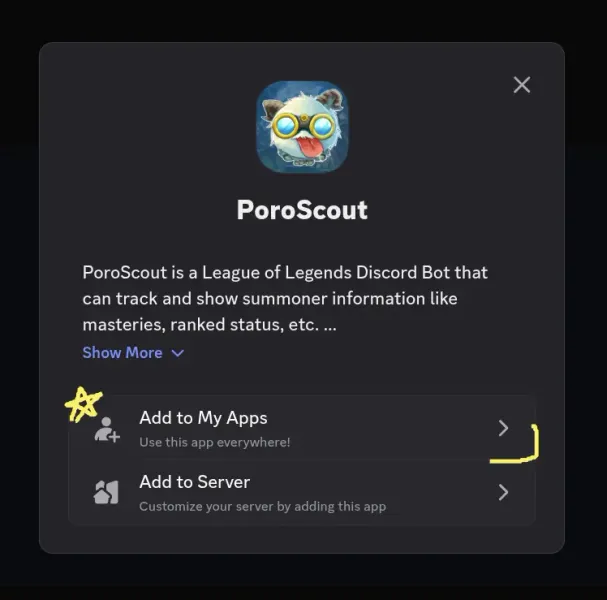
Take PoroScout with you anywhere by adding it to your Discord account. This will let you use PoroScout commands in all servers, including DMs and groupchats, allowing you to flex your skills anywhere. Server owners can disable this feature by disallowing the use of external user-scope commands.
To get started, simply re-authorize the bot to allow access to create global commands:
⚔️ Matches Command Update
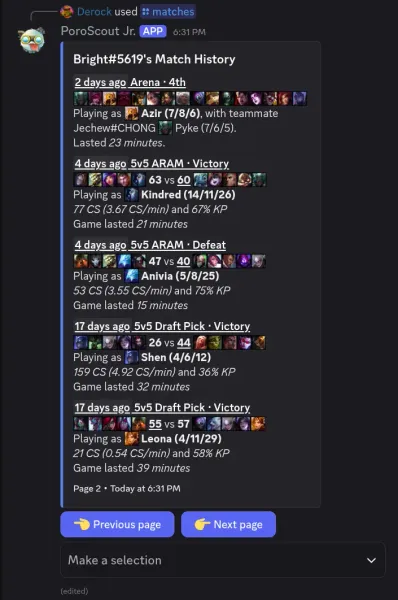
The /matches command has been completely reworked.
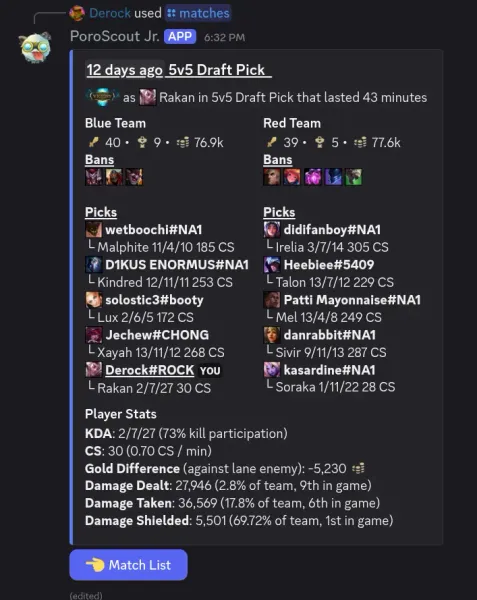
You are no longer limited to just the first page of results, as pagination has been added. Simply click the previous/next page buttons to scroll through the match list. You will see a little loading indicator at the bottom when the bot is preparing the next page. The dropdown below the buttons can be then used to view a more detailed breakdown of a match. Support for the Arena gamemode has been added.
️🖼️ Emoji System Overhaul
PoroScout no longer needs the Use External Emojis permission, as we have migrated to Discord’s new bot-emoji system. Emojis have also been entirely renamed, going from cryptic IDs (e.g. 1295) to helpful names (like i_navori_flickerblades). Now, if you are unsure of what item or champion is being displayed, you can simply click the emoji and view the name.
🛠️ General Fixes
- A recent change by Riot transitioned their system from using summoner IDs to PUUIDs. As a result, PoroScout was unable to obtain player information, and this led to widespread issues with many commands. This has been fixed.
- Error handling has been improved with better messaging. Many commands can now handle partial errors too, displaying all that it is able to obtain, and including a small message noting what data the bot failed to obtain.
- The /champion command now uses a more concise display of skill order for simpler viewing on smaller devices.