Commands
/status
Check for active Riot Games incidents and scheduled maintenance in a specific region.
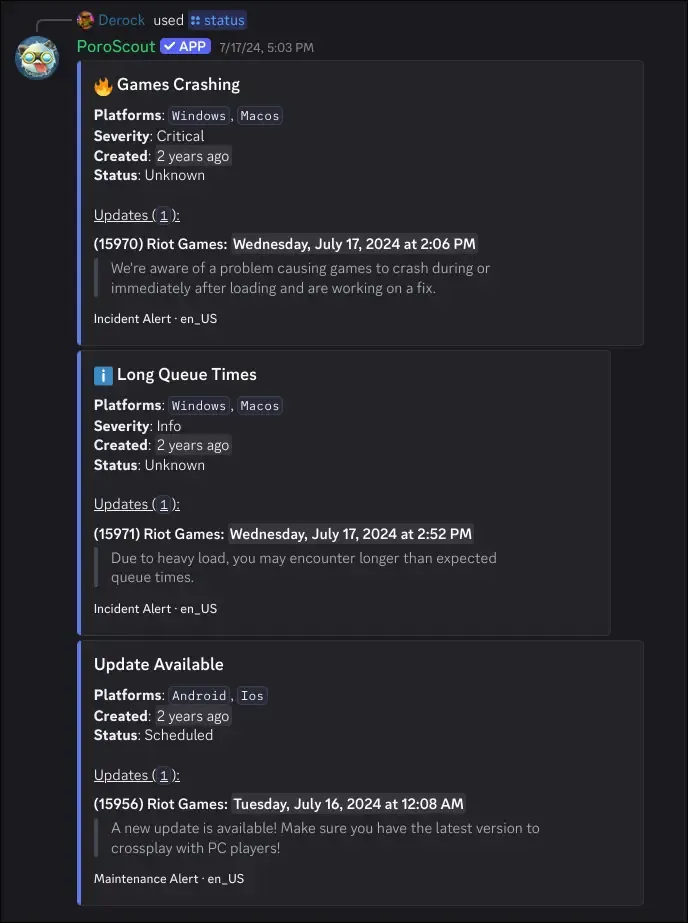
/status pulls the current Riot Games platform status for a given region. If everything is running normally, it says so. If there are active incidents or scheduled maintenances, each one gets its own embed with details.
What it shows
When there are no issues, a single embed confirms the region is fully operational.
When incidents or maintenances exist, each one is shown as a separate embed with:
- Title of the incident or maintenance (localized to your Discord language when available).
- Platforms affected (for example,
Game,Client). - Severity for incidents: info, warn, or critical. Critical incidents are marked with a fire icon, warnings get a caution icon.
- Created relative timestamp.
- Status of the maintenance (for example, “In Progress”, “Scheduled”, “Complete”).
- Updated timestamp, if the issue has received updates.
- Updates log showing each posted update with the author, timestamp, and their message.
The embed footer labels whether it is an incident or a maintenance, along with the locale of the text.
Usage
/status region:<region>| Option | Required | Description |
|---|---|---|
region | Yes | The region to check (NA1, EUW1, etc.). |
Example
Tips
- If a command like
/profileor/matchesis returning errors unexpectedly, checking/statusfor your region is a good first step. - Riot’s status page at status.riotgames.com is the same source of truth this command reads from.