Commands
/patchnotes
Read the latest League of Legends patch notes directly in Discord, or look up a specific past patch.
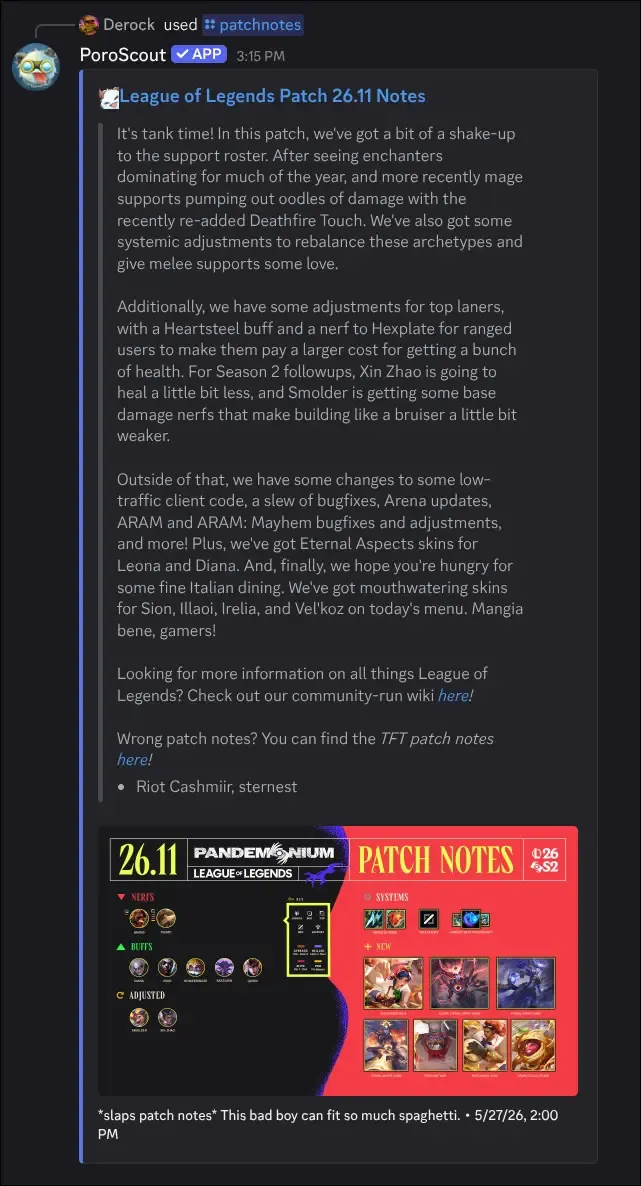
/patchnotes fetches the patch notes for the current patch (or any recent past patch you specify) and posts a summary embed with the title, description, authors, image, and a link to the full article.
What it shows
The embed includes:
- The patch title (for example, “Patch 14.12 Notes”).
- The summary description covering the main changes.
- The authors who wrote the notes, listed at the bottom of the description.
- The patch artwork image used in the official article.
- A timestamp with the patch publication date.
- A link to the full official patch notes page.
Usage
/patchnotes
/patchnotes version:<version>| Option | Required | Description |
|---|---|---|
version | No | The patch to retrieve (for example, 14.11). Autocompletes. Leave blank for the latest. |
The version field autocompletes as you type, so you can search by major and minor version number. Older versions may not be available.
Example
Tips
- To get patch notes automatically posted in your server every patch, set up the
/configure patchnoteschannel subscription. - For a quick look at how a specific champion changed, combine this with
/championto see their updated stats and build.