Commands
/counters
Find which champions have the highest win rate against a given champion.
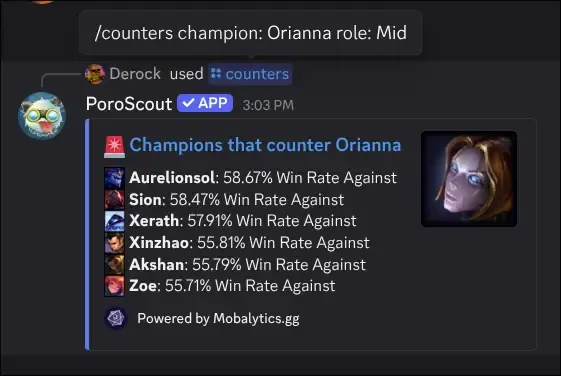
/counters lists the champions that statistically beat a given pick. Each entry shows the counter’s win rate against the target champion, along with which role that matchup data comes from. Useful for draft prep or when you are figuring out what to ban.
What it shows
The embed lists counter picks ranked by their win rate against the specified champion. Each entry includes:
- The counter champion’s icon and name.
- The role the matchup applies to (when known).
- The win rate that champion achieves against your target.
The thumbnail shows the target champion’s splash. A link to the full Mobalytics counters page is included at the bottom.
Usage
/counters champion:<champion>
/counters champion:<champion> role:<role>| Option | Required | Description |
|---|---|---|
champion | Yes | The champion you want to find counters for (autocompletes as you type). |
role | No | Filter counter data to a specific role. |
Adding a role narrows the matchup data to that lane, which matters for flex picks where the same champion might be countered differently in different positions.
Example
Tips
- For the flip side (who your champion beats), use
/synergiesto find allies, or check the counter list of the enemy champion instead. - Counter data comes from Mobalytics.gg and reflects the current patch.